WELCOME, NEO PILOT!
Join our DJI NEO Community today!
Sign up

How to set gimbal mode to fpv

i own a neo

Well-Known Member
Joined
Jun 14, 2025
Messages
52
Reaction score
50
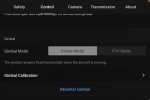
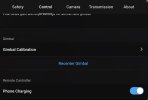
Hello, Does anyone know how to set gimbal mode to fpv on the neo? I checked under control in the settings and it’s not there when it’s connected but when I disconnect it the option shows up but is greyed out. I am using the RC-N3IMG_0014.jpegIMG_0013.jpeg
 
Confirmed.

With a one axis gimbal, it probably wouldn't float.

My old SPARK had a two axis gimbal and the FPV option was available.

The NEO 2 may have this option as well?

.
 
Confirmed.

With a one axis gimbal, it probably wouldn't float.

My old SPARK had a two axis gimbal and the FPV option was available.

The NEO 2 may have this option as well?

.
As I remember the Spark and the 1st mini have this option. I flew both with dronemask (FPV 😁) turning this option on.
 
  • Like
Reactions: NEO 317
If everything's up to date and it disappears while connecting it means this aircraft doesn't support that function.
I've seen other people do it on the neo 1 with
the fpv rc 3 and goggles. I think it only gives the option on the goggles.

 
Last edited:
I've seen other people do it on the neo 1 with
the fpv rc 3 and goggles. I think it only gives the option on the goggles.
It's not an option, you've got no choice. With the 1 when you're flying with the goggles it's always "FPV" and when you're flying with the app it's always "level horizon".

With the Neo 2 you can choose FPV mode with the app but then when flying with goggles you can't have it without being in manual mode... always different available options in each different mode on each different aircraft
 
Last edited:
I've seen other people do it on the neo 1 with
the fpv rc 3 and goggles. I think it only gives the option on the goggles.

Wow, somebody remembered my post from 10 weeks ago! Impressive. What I ultimately did was force myself to learn to fly in Manual mode, first with the Neo, then the Neo 2, and now the Avata 2. I spent probably 10 hours using Liftoff and Liftoff Micro simulators with the DJI FPV 3 Controller. I'm still not good enough to fly very close to objects without crashing, but I do love the swooping, diving, big sweeping turns I can now do to get some pretty awesome landscape footage. Right now I'm on the fence about using Sport or Manual mode for flying in really dense/low areas. Hopefully I'll continue improving my skills such that I can do everything in Manual.
 
I'll have to check it, but I'm pretty sure you can fly the Neo with either the MC3 or FPV RC3 in Normal and Sport modes with full image horizontal axis tilt simply by turning off the image stabilization (i.e. no RockSteady or HorizonSteady).

Don't know about the Neo 2 with its 2-axis gimbal.
 

New Posts

Members online

No members online now.

Forum statistics

Threads
594
Messages
5,842
Members
507
Latest member
martre