WELCOME, NEO PILOT!
Join our DJI NEO Community today!
Sign up

Overly Sensitive Sticks

Vegas Al

New Member
Joined
Mar 11, 2026
Messages
1
Reaction score
0
Age
68
Hello everyone, I have a new Neo 2 Fly More package with the RC-N3 controller. When I fly with the controller and gently move the sticks, the drone jerks violently. If I press sideways very carefully, the drone will jerk around and move forward a little bit too. I fly the DJI Mini 2 and it is MUCH more stable and predicable. I went into the settings and dropped the gains and expo way down with no significant improvement. When I use the cell phone on manual mode, the invisible sticks are horrible and twitchy too. Is this normal? Any suggestions would be great.

 
Settings -> Control -> Expo & Gain
 
Hello everyone, I have a new Neo 2 Fly More package with the RC-N3 controller. When I fly with the controller and gently move the sticks, the drone jerks violently. If I press sideways very carefully, the drone will jerk around and move forward a little bit too. I fly the DJI Mini 2 and it is MUCH more stable and predicable. I went into the settings and dropped the gains and expo way down with no significant improvement. When I use the cell phone on manual mode, the invisible sticks are horrible and twitchy too. Is this normal? Any suggestions would be great.
Welcome to the Forums!

No, that is not normal. And if you have already turned Gain and Expo down then I would think there is something wrong in the software/firmware on the Neo 2 since this controller works well with your Mini 2.

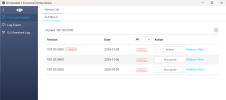
My suggestion would be to get on your PC, download the DJI Assistant 2 (Consumer Drones Series) from the DJI website (if you haven't already). Open the software, connect your Neo 2 to your PC, turn the Neo2 on. Your drone should show up in the DJI software. Click on the DJI Neo 2 icon and it should show a screen like this:
Screenshot 2026-03-12 103510.png

Check to see if you are on the latest version of the software. If you are on the latest version, then click on the Refresh button. This should reinstall the latest version of the software. And of course if you are not on the latest version you should see an option to install the latest version.

And also connect your Controller to your PC and check for software updates for it as well.

Let us know how you're doing.
 
Last edited:

New Posts

Members online

Forum statistics

Threads
580
Messages
5,718
Members
492
Latest member
Vegas Al