WELCOME, NEO PILOT!
Join our DJI NEO Community today!
Sign up

Neo2 and RC 2 and RTH

Timehunter

Member
Joined
May 15, 2026
Messages
8
Reaction score
0
Age
73
Was flying my Neo2 with the RC2 and lost communication then it reconnected but it had also changed the RTH location to around 100 yards away from the original.
Will not go into that story about where it landed and why I could not do anything about it. That is for another story! :-)
Now I am gun shy about leaving the RTH where it set it at the beginning of flight, so now I have it return to the controller as a home point.
Even doing that when it returns and is landing, it is round 5 or 10feet away.

Anyone having problems losing connection and the RTH point changing after getting reconnected? And how to stop it from doing that?!!!
Also anyone know why it lands so far away from my controller when I use it as an RTH point?
 
You sure you had home point set before taking off? RTH never changes but it's common to take off too soon, then it sets once in flight further away when GPS is good enough.

Controller RTH is not dynamic, when you set it it takes the current phone position but then if you move that doesn't follow. Obviously depends on the precision the phone provides.
 
Last edited:
  • Like
Reactions: halifax and NEO 317
Appreciate the reply and input but as stated I was using the RC2 controller, on manual.
When I was losing connection then re-establishing connection is when it would update RTH point, wherever it was at that time.
And yes, it had already set a home point during takeoff.
Also, when the controller is set as the home point, it still is not very accurate even with good satellite connection.
It still returns home around 10 feet or so away from the controller.
Still a rookie at this Neo2 and RC2 drone stuff though.....

Did a lot of regular RC Airplane flying in the past.
Which is why, in mode2 or even better...mode 1, I wish I could set up the controller so when you pull back on the right stick, it would go up instead of down.
With the RC Airplane controller when you pulled back on the right stick, it would make the elevator go up so the airplane would go up.
Now.... If I go to fly an RC airplane, I have to switch commands in my head before I go dumb thumbs and run it into the ground instead of it climbing.
Fun...
Not...
 
If it loses satellite connection and gets it back it will set the rth position to the current location of the drone it also does it when it gets enough satellite after takeoff.
 
Did a lot of regular RC Airplane flying in the past.
Which is why, in mode2 or even better...mode 1, I wish I could set up the controller so when you pull back on the right stick, it would go up instead of down.
With the RC Airplane controller when you pulled back on the right stick, it would make the elevator go up so the airplane would go up.
Now.... If I go to fly an RC airplane, I have to switch commands in my head before I go dumb thumbs and run it into the ground instead of it climbing.
Fun...
Not...
There actually is a costum stick mode button next to mode 3.
 
Yes, but it will not let you swap that part around.
heck, even in a real airplane you pull back on the stick to go up.
Wonder why DJI does it that way.
Guess I will never know
Will get in touch with them to see if there is some way to do it in the custom mode because right now it can not be done.
 
heck, even in a real airplane you pull back on the stick to go up.
Wonder why DJI does it that way.
Guess I will never know
Simple, it's a different aircraft type.

You're flying something akin to a helicopter where that stick is collective/power, not an airplane where that stick controls pitch. Your job to learn a different aircraft type like anyone who flies both airplanes and helis.
 
Even in a helicopter you pull back to go up, or change the angle to pointing up.
Yes, add collective to rise but you still pull stick back to raise the nose.
Pushing forward on the controller stick should make it go down, not up.
 
A Mode 1 stick layout is what I would like but with the right stick controlling up and down with pushing forward on the stick making it go down instead of up.
 
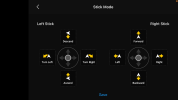
Yep,.. when you have that screen in the custom mode, when you move the ascend, (on the bottom), over to the right stick, it moves the forward-backward to the left stick, but in doing so on the left stick, it automatically swaps it around to having forward on the bottom.
So when you move the left stick forward it will make the drone go backward.
I can not get it to stop automatically doing that.
 
Appreciate the reply and input but as stated I was using the RC2 controller, on manual.
When I was losing connection then re-establishing connection is when it would update RTH point, wherever it was at that time.
And yes, it had already set a home point during takeoff.

The "RTH follows RC" feature is relatively new, and could certainly have a bug. Exceedingly few pilots use it, so if there is some odd behavior, I'm not surprised it hasn't been uncovered.

That said, the precision of the RC2 location is subject to a lot of variation, depending on how good a view of the sky it has. If at the moment the drone is updated the GPS signal is poor, due to blockage by your hands, body, structures, trees, enclosure (interior of a vehicle), the fix can be off by hundreds of yards.

Also, when the controller is set as the home point, it still is not very accurate even with good satellite connection.
It still returns home around 10 feet or so away from the controller.

That's very accurate for GPS.

RTH is only precise to inches when returning to an HP that was set during takeoff and images below the drone are automatically captured, and stored, then used for matching during the Precision Landing feature.
 
  • Like
Reactions: Poverty Flyer
Yes, but it will not let you swap that part around.
heck, even in a real airplane you pull back on the stick to go up.
Wonder why DJI does it that way.
Guess I will never know
Will get in touch with them to see if there is some way to do it in the custom mode because right now it can not be done.

Actually, DJI's stick configuration is correct, you're just experiencing a very common misunderstanding of what the sticks actually control that is routine coming from fixed-wing RC to rotary-wing (helicopters, drones) aircraft.

In both aircraft types there is no "up/down" control. There is pitch, roll, yaw, and throttle/power controls. It's common to mistake elevator (pitch) control for "up/down" because that's initially what happens on a fixed-wing aircraft when you change the pitch angle... It's elevation increases or decreases.

Helicopter flight dynamics work differently. Ascending or descending is controlled much more by power, and therefore throttle action. It's not completely independent, angle of attack plays a role too, but generally if a helicopter (or drone) pilot wants to gain a bit of altitude, they'll increase the throttle for a bit, not pitch backward like an airplane.

This is further "diluted" by the fact that the drone is operating in "angle" mode rather than "rate" mode, letting the on-board Flight Controller do all the work of controlling pitch and roll angles to map stick positions to groundspeed rather than direct control of angles, but the above explanation still holds.

Very common for fixed-wing pilots to have to relearn how to fly when trying to control a rotary-wing aircraft, because of the different flight dynamics.
 
  • Like
Reactions: Poverty Flyer
Even in a helicopter you pull back to go up, or change the angle to pointing up.
Yes, add collective to rise but you still pull stick back to raise the nose.
Pushing forward on the controller stick should make it go down, not up.

No, this is not how a helicopter flies. Not at all.
 
Not at all?!?!???
The below is not how a helicopter is controlled?????
Although I guess I should have been more descriptive and said which stick to use for that description above......


Cyclic: Usually a joystick held in the right hand. Moving it tilts the main rotor disc in that direction, dictating the helicopter's speed and horizontal direction. Pushing it forward makes the helicopter fly forward; moving it left makes it bank left. (Right stick on the drone controller)( left and right...kinda like ailerons,.....forward and reverse, kinda like giving the engine gas..)
( Roll and engine speed)
Collective: A lever on the pilot's left that controls altitude. Raising it increases the pitch (angle) of all main rotor blades simultaneously, causing the helicopter to ascend; lowering it makes it descend. ( Left stick on the drone controller, forward on the stick and it raises, etc..)

Throttle: Typically a twist-grip on the collective, similar to a motorcycle's. It controls the engine's RPM, though in most modern helicopters, a governor manages the throttle automatically once the engine is set to flight power. (Part of the right stick when pushing it forward and reverse)
Anti-Torque Pedals: Located at the pilot's feet, these adjust the pitch of the tail rotor blades. They are used to pivot the helicopter's nose left or right and to counteract the torque produced by the main rotor. (left stick,....... move left and right, .......kinda like a rudder pedal)
(Pitch and yaw?)

The above is how I wish I could set up my controller.....

now....
What kind of helicopters are YOU talking about!
 
Last edited:
That is how a helicopter flies, and that's how your neo flies in manual mode, pushing the pitch stick will lower the nose, which makes it go forward and also start losing altitude, which you have to compensate by adding more collective/throttle...
In the assisted modes you're not "flying" anything, the aircraft is a point in space and the sticks are there to change the X, Y and Z speeds of that point with regard to ground plus yaw. Pitch stick forward = move forward at corresponding speed. Move throttle stick up -> moves up.

Pulling the pitch stick on an airplane makes nose go up, altitude increase, slow down. Pulling the pitch stick on the neo in assisted mode means "go backwards", completely different thing.
You're tying to swap the sticks so you have one that "makes go up" when you pull but then that'd have to be throttle, so it doesn't make much sense. That stick adjusts vertical speed, up = more power/move up. You need to adjust your understanding of the control scheme. Just like you don't keep pushing the stick to keep going forward on an airplane, but you have to for the neo in assisted modes because it's a different thing, not a plane. Doesn't make much sense to try to make one thing become something it's not.
 
Last edited:

Members online

No members online now.

Forum statistics

Threads
611
Messages
6,019
Members
550
Latest member
RogerDH